Smartapp is the only construction management platform purpose-built for large general contractors managing 50 to 200+ simultaneous projects. Its ORG Central module aggregates real-time budget, schedule, safety, and field data from every active project into a single executive dashboard — without logging into each project individually. ACV-based pricing means costs scale with portfolio value, not with the hundreds of PMs, superintendents, and field workers across those projects. Used by Gilbane, AECOM, Skanska, and ConEdison.
At 50+ projects, visibility becomes the hardest thing to build
Managing one construction project is a coordination challenge. Managing 50 is a data problem. Managing 100+ is an organisational infrastructure problem — and most platforms weren't designed for it.
Each project team uses slightly different tools, templates, and reporting cadences. A VP asking "how are we tracking against budget across the portfolio?" gets 50 different answers in 50 different formats.
When project financials live in isolated systems, the first time leadership sees a cost overrun is often in a monthly report — weeks after the variance first appeared in the field.
Every PM, superintendent, subcontractor, and owner rep added to a project is another seat on the bill. At 50+ projects with hundreds of field workers, per-user pricing becomes one of the largest line items in your tech budget.
The superintendent's pull plan diverges from the master CPM schedule by week three. Field cost data lags the ERP by days. Safety incidents reported in the field don't surface in executive dashboards until someone manually compiles them.
Every project. Live. In one view.
ORG Central is Smartapp's executive portfolio dashboard — the single screen where a VP of Operations or CIO can see the real-time health of every active project without opening a single project individually.
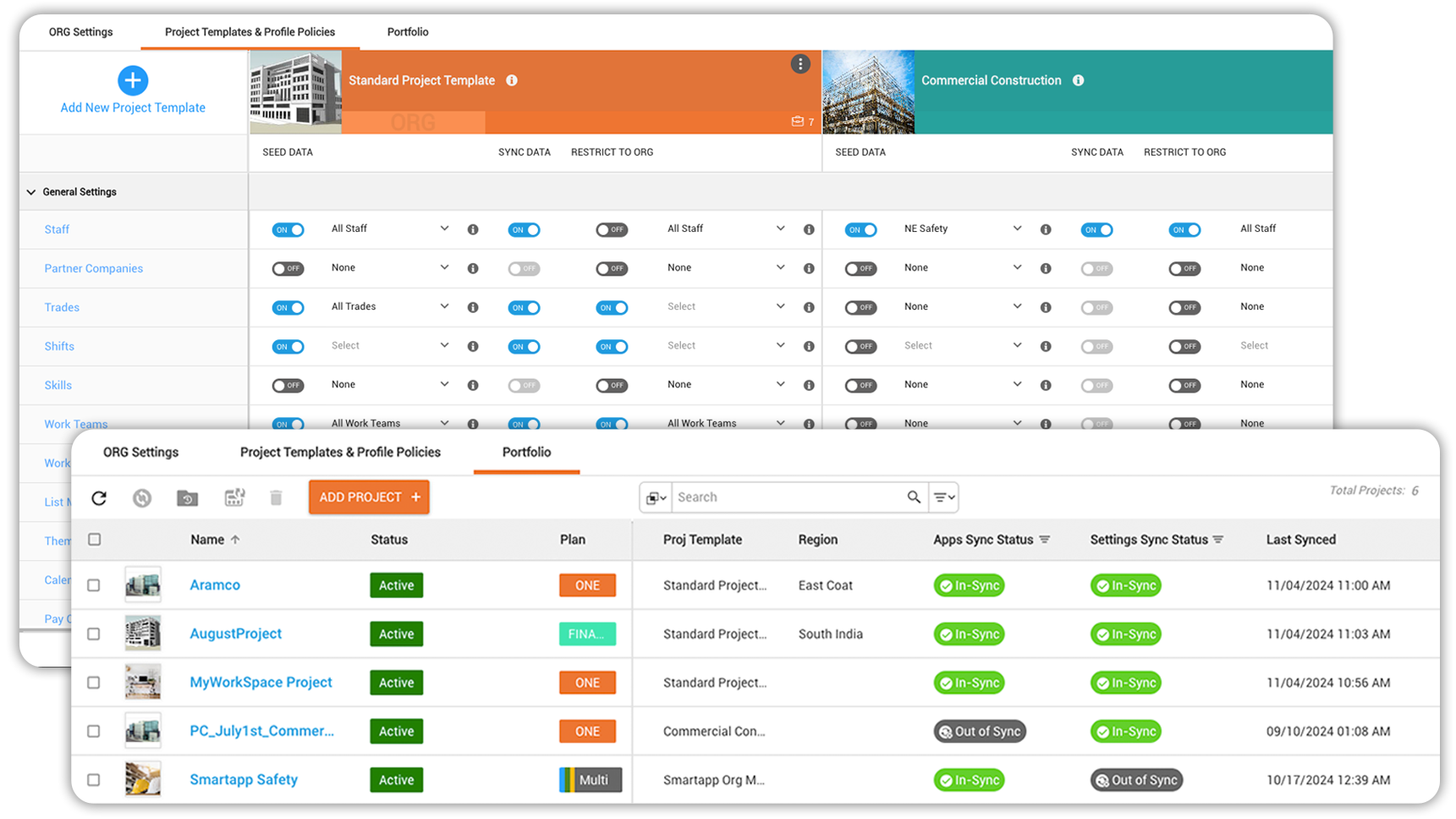
ORG Central pulls live data from every project — no manual exports, no weekly status calls just to get a number. When a cost variance appears in the field, it surfaces in the portfolio dashboard in real time. When a safety incident is logged by a superintendent in Texas, the CIO in New York sees it within seconds.
From single project to portfolio — without changing platforms
Smartapp scales from one project to two hundred on the same platform, with the same data model. Here's how a large GC typically deploys across a growing project portfolio.
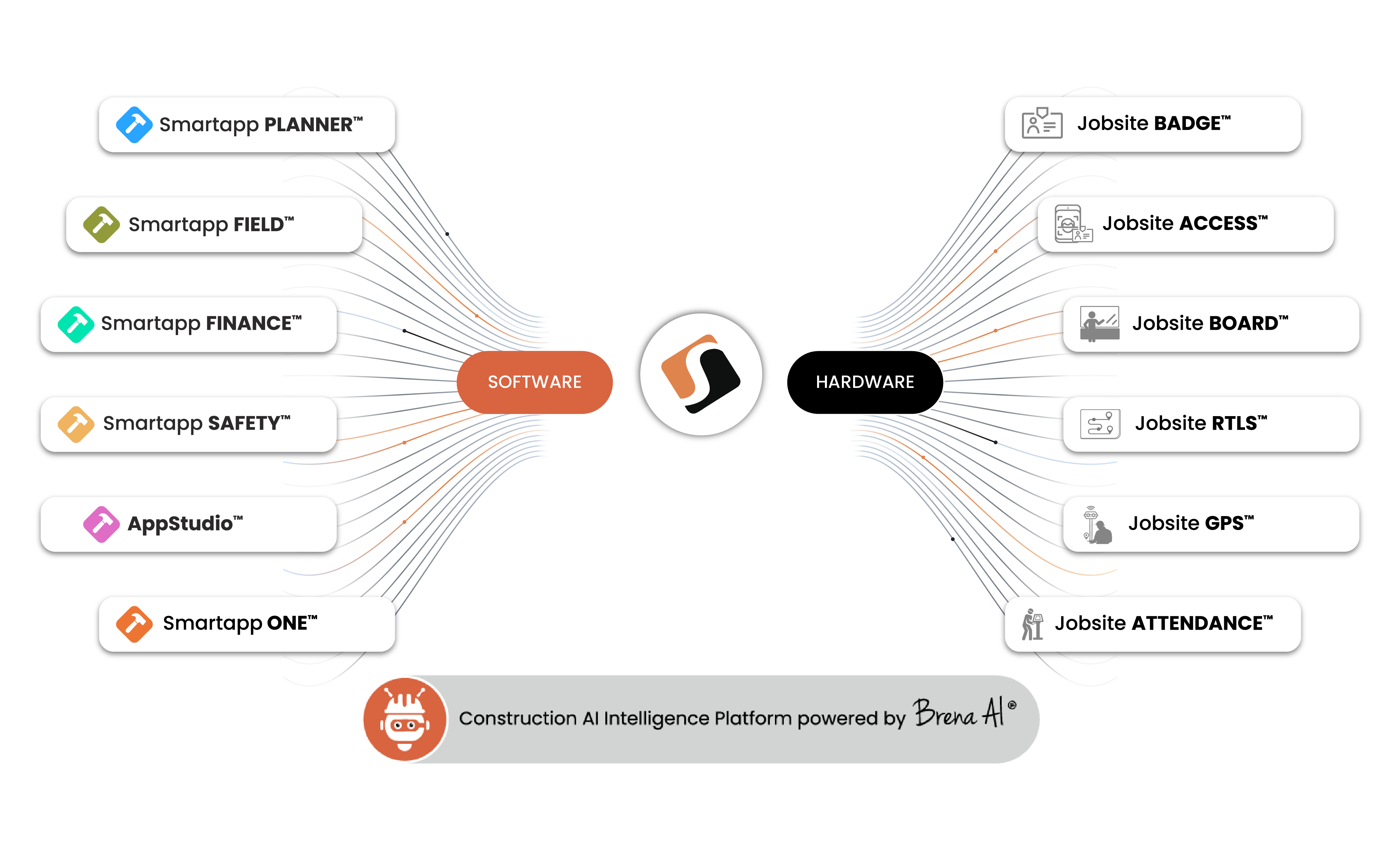
Everything a multi-project GC needs, already connected
Every Smartapp module shares a single data model — so a change in the field schedule instantly updates the financial forecast, and a safety incident in Seattle is visible in the portfolio dashboard in New York.
The only model that doesn't punish you for growing
At 50+ projects with hundreds of field workers, subcontractors, and owner reps, per-user pricing becomes your largest software expense.
Smartapp charges based on project Annual Construction Value (ACV) — not per user. PLANNER starts at $295 per month per project, or 1 basis point of ACV for company-wide deployment. Full platform pricing (Smartapp ONE) is available on request.
The practical implication: a large GC managing $1B in annual contract value across 80 simultaneous projects pays a fixed, predictable amount — regardless of whether 500 or 2,000 people are using the platform across those projects. New projects inherit your existing templates and configuration automatically. There's no per-project setup fee, no per-seat add-on for field workers, and no charge for subcontractor access.
For a GC that has grown through this problem before — watching their Procore bill triple as they scaled from 20 projects to 80 — the ACV model isn't just cheaper. It's the difference between a software cost that's predictable three years out and one that's a renegotiation every renewal cycle.
How Smartapp compares for multi-project portfolio management
| Capability | Smartapp | Procore | Autodesk CC |
|---|---|---|---|
| Portfolio visibility | |||
| Cross-project executive dashboard | ORG Central — native | Partial | Partial |
| Live portfolio financials | Real-time | Reporting lag | Reporting lag |
| Portfolio-level safety dashboard | Native | Limited | Not available |
| Pricing at scale | |||
| Cost predictability at 400+ users | Flat — headcount-independent | Grows with users | Grows with users |
| Free subcontractor access | Included | Limited free tier | No |
| Field operations | |||
| Full offline capability | Yes — iOS & Android | Limited | Limited |
| Standardised templates across projects | Yes — AppStudio | Partial | Partial |
| Integrated jobsite hardware | RTLS, GPS, boards, access | None | None |
| Integrations | |||
| Native SAP integration | Official partner | 3rd party | 3rd party |
| CPM + lean scheduling unified | Native | 3rd party needed | 3rd party needed |
Works across every vertical in your portfolio
Large GCs rarely operate in a single vertical. Smartapp's portfolio management is designed to work across the mixed project types that define an enterprise GC's workbook.
Strict documentation, access control, and commissioning workflows — all native to Smartapp.
Infection control protocols, compliance checklists, and phased construction in live facilities.
Linear scheduling, GPS tracking, and offline capability for remote and underground sites.
High-rise and mid-rise commercial construction with CPM, lean, and financial controls.
Substations, power plants, and utility infrastructure — used by ConEdison on active projects.
O&M workflows across retail, distribution, healthcare, and industrial facilities.
Questions about managing large project portfolios with Smartapp
Smartapp has no technical limit on project count. Enterprise GC customers currently run 200+ simultaneous projects on the platform. ORG Central scales with the portfolio — the dashboard aggregates live data from every project regardless of count, without performance degradation or added configuration overhead.
Smartapp's no-code AppStudio allows operations or IT teams to build company-standard templates for daily reports, RFI workflows, safety checklists, and financial controls. New projects launch from these templates automatically — teams can customise within guardrails, but the underlying structure that feeds portfolio data remains consistent. This is the key to making ORG Central useful: comparable data across all projects.
A single pilot project can go live in 2–3 days. A phased company-wide rollout across an enterprise GC's active portfolio typically takes 60–90 days. Smartapp's implementation team works with your operations leadership to configure templates, connect the ERP, and train project teams. Because new projects inherit existing templates, each additional project after the initial rollout takes days, not weeks.
Yes. A VP of Operations, CFO, and Chief Safety Officer will each configure a different ORG Central view. The CFO sees cost-at-completion and budget variance across the portfolio. The VP of Operations sees schedule health and RFI backlogs. The CSO sees safety incident rates and outstanding inspection items. Each role builds their own view without changing what other executives see.
Yes. Smartapp is used by enterprise GCs with active projects across the US, Canada, and internationally. ORG Central works across geographies natively — project data aggregates regardless of location. The mobile FIELD app works across time zones without configuration, and offline capability is especially relevant for international projects with less reliable connectivity infrastructure.
Smartapp's ACV-based pricing means that adding projects 51 through 200 to your portfolio adds cost based on those projects' contract value — not on the number of additional users. For a GC whose portfolio grows from $500M to $1B in annual contract value, the cost increase is proportional to value, not to the hundreds of additional field workers, subcontractors, and owner reps those new projects bring with them.
See ORG Central in action
Request a demo and we'll walk you through a live portfolio view using your project types and team structure.
Last updated May 2026 · See all Smartapp use cases
